I made this switch after feeling like Microsoft is potentially steering Windows 10 Mobile in the wrong direction with the last few months of builds.
So I wrote this, talking about some of the little things that I miss about Windows.
This is NOT a review in any way. So don't interpret it as one. This is about my experience using Android for about one week which has caused me to appreciate some of the smaller things that Windows 10 Mobile offers. I love using W10M, get over it.
Background
I've been using Windows 10 Mobile (switching back and forth between slow and fast ring) for several years now (blah blah--not production--get over it). Having never suffered from some major issues (except one time, just bought another phone), as a developer, I enjoyed seeing the most recent features the dev team was working on.In the past few months I've been having some weird issues that never seemed to get resolved, release after release, feedback after feedback. One of them, was intermittent notifications on my 735, an incredibly frustrating bug. Another was that no computer would detect my device and allow me to browse the files, which could possibly be a hardware issue. Still, it is an issue and I needed a solution.
After Microsoft's recent slashing of supported devices, I felt the need to make the switch. Even though my device wasn't on the list, it was still a frustrating moment.
In the Windows 10 Mobile community you'll probably see people perceive this one of two ways: Windows Mobile is dead or new devices are coming soon. Which is also the view point for literally everything else Microsoft does with this platform.
Keyboard
I have tried almost every non-gimmicky keyboard in the Google Play Store, and every single one is a horrible experience. Yes, even Gboard which is what I'll be talking about.Maybe it is the fact that I've been using a different keyboard for years, but I just feel that this keyboard is horribly designed when compared to the W10M keyboard.

Pictured above is a screenshot of four Android 7.1.1 keyboards (Gboard) and the equivalent in Windows 10 Mobile.
One thing I love about W10M keyboard is consistency. In each keyboard you have the same bar at the top with the microphone, in this bar is where autocorrect suggestions appear. Even on the emoji keyboard, while Google drops that in favor of an emoji search bar. On the emoji keyboard for Google you can even search for gifs (*cringe*). Don't even get me started on the stock Android emojis (
 ). Check out EmojiOne, because standards benefit everyone (also--Windows, support changable emojis).
Seriously consider the placement of punctuation and symbols on both keyboards. On Windows, the "?" and the "!" are separated by several other characters. Which makes sense, seeing as accidentally using one over the other can completely change what you're saying. I can't remember the last time I actually used an exclamation point!
The "!" on the Google keyboard is the same location as the "?" on the Windows keyboard--I keep ending my questions with an exclamation point...
Both support swipe typing, which seems great, but I've never actually seen anyone use it in the wild.
Settings
One thing that is great about Microsoft's Windows 10 and Windows Phone marriage with UWP is that things become extremely unified. I never really appreciated how apps tie into the system settings until I switch to Android.Even though this transition was a little slow, and frustrating, it ended up beautiful.
Unlike Android,
Not only does this put more work on the app developers, but it forces users to submit to them. If an app doesn't want you to change it's notification sound, it probably won't let you, or is going to make it very difficult.
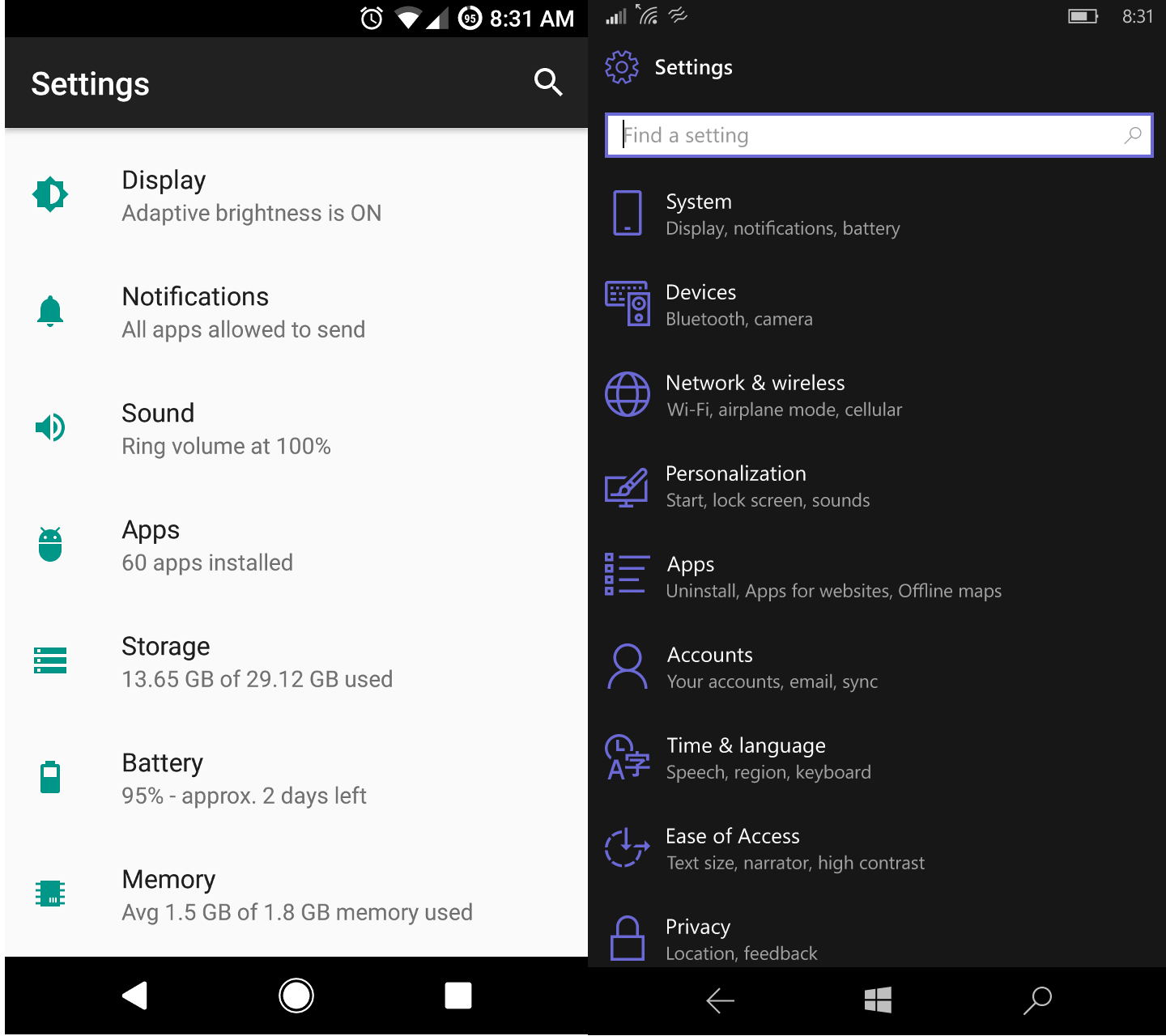
The Android Settings app feels like a bunch of empty space and unintuitive navigation. On the Windows app, below the title of each section you see a list of sub-sections.
But, on the Android, you see a somewhat important setting that is under each category. Under "Display" you see "Adaptive brightness is ON" when there is soo much more that goes under that category than just adaptive brightness.
Since phones are getting more customizable and more complex, settings might not be under the category you would thing they are. Microsofts approach to listing subcategories really helps with this problem. But still suffers from round-about settings menus occassionaly
I really want to emphasize my appreciation for the Windows 10/Mobile settings. Thank you, Microsoft.
After working in IT for many years, I had no clue there were so many ways to configure Wi-Fi (looking at you, Android).
Community
The Android community is very different from the Windows Phone community. On Android you earn the ability to customize you phone way beyong what you can on a Windows Phone.This leads to a community of people who work very hard to develop things like custom ROMs that you can flash on your phone. Since there is no shortage of custom ROMs for most phones, even my Moto G4, this leads to an overload of information on the web about flashing a ROM.
While a seasoned Android user might have no trouble digging through 200 pages on an XDA thread just to find a single piece of infromation on a bug they're experiencing on a custom ROM, or a proper tutorial that doesn't conflict with another one they found, this is very intimidating to new users, even ones with a technical background.
This is partially due to the vast amounts of Android phones on the market, and manufacturers producing very similar phones except with a few different components that don't function properly when you flash a ROM meant for a different variation model.
Since there is no standard on releasing infromation on custom ROMs you get multiple forums, websites, and open source hosting websites that are used to feature new releases, report bugs, and chat about the product.
The ability to flash a custom operating system to your phone is something nearly everyone could benefit from, for whatever reason.
For Windows Phone users, this ability would be nice, but is currently beyond the concern of W10M, which is designed to be easy to use, beatiful, and functional.
With that said, being open source is definitely something W10M could benefit from, as it could potentially draw in new users and devlopers.
If you ever actually meet a person who uses a Windows Phone, and they enjoy it, you'll immediately have something in common that others don't. Sure, this is because the market share of W10M is so small compared to Android that it forms a cult following, but it still provides that common interest between the two of you.
This cult following is just something that Android can't provide.
Applications
Yes, everyone is aware of the "app gap." Personally, I don't use my phone for anything other than reddit, web browsing, keeping in contact with people, and the occassional game to pass the time. Therefore, I do not feel that the app gap impacts me as much as others. So I'm not going to talk about it, get over it.Similarly, you are probably aware thet Microsoft often neglects its own platform. And that sucks, but there is so much more to the applications on W10M than Microsofts apps.
The Google Play store is rapidly increasing in size while the Windows Store is way behind in quantity.
Since Android is used a lot more than W10M the apps produced by large companies such as Facebook, Instagram, and others are going to get the newest features quicker and be updated on a regular basis. If you insist on having the newest gimick features of an app like that, then don't use a Windwos Phone. It's as simple as that, use an Android or an iPhone.
Personally, I much rather prefered the Windows Store than the Google Play Store. Simply because there are not so many junk applications on there (or are hidden below better apps). Sure, the apps might be older, outdated, or just a web wrapper, but they're functional and are often not loaded with ridiculous fullscreen popup ads.
One thing I did notice is that the Google Play Store has improved since I last used Android. It's not as difficult now to find a stupid simple app such as a compass that doesn't have ads in it.
On the Windows Store you will also find brilliantly developed 3rd party apps for things such as Reddit, Instagram, and more, that provide a rich experience and more customization than an offical app would. These apps are often developed by people who are very passionate about the Windows platform, that provide great customer service, are very friendly, and work to actually improve the platform.
Since the Google Play Store and Android community are very large, it is very possible that I simply miss these.
Conclusion
Both platforms are great, in their own ways. I definitely feel that Windows 10 Mobile provides a cleaner interface, more simplistic/user-friendly interface, and great compatibility with most computers.However, the current lack of phones and bad practices by Windows 10, which put a bad taste everyone's mouth about Microsoft, means that Windows 10 Mobile needs some serious tender love and care.
Decisions like chopping Messaging Everywhere once it was finally working and pushing users to use Skype as their new SMS app (and taking a while to get SMS sync with that) is a real turn-off to users. Come up with a game plan and stick with it.
There is much Microsoft can learn from Android.
I'll happily switch back to Windows 10 Mobile once new phones are released.